



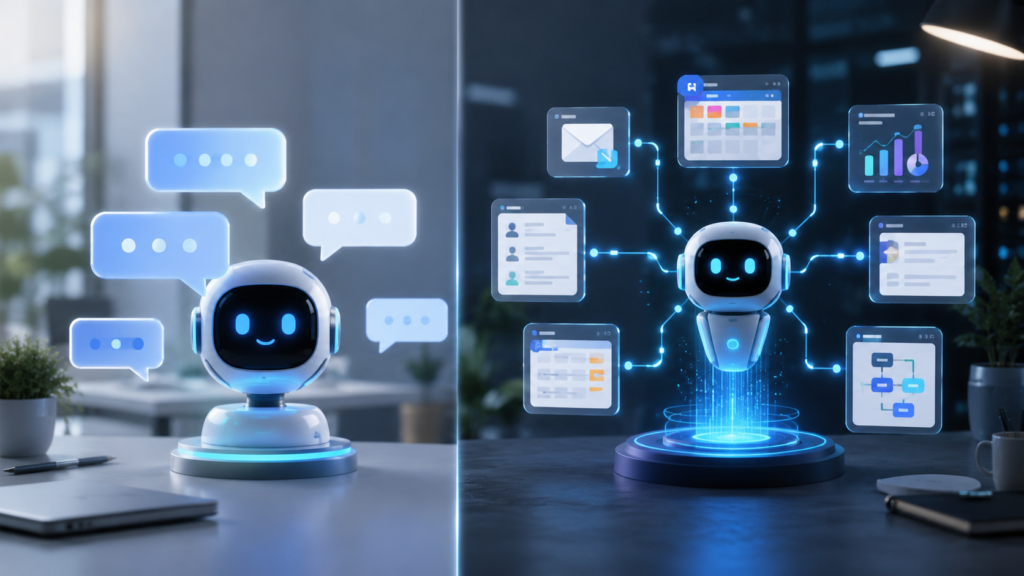
Quick answer: A chatbot is mainly designed to communicate with users and answer questions. An AI agent can go further by planning steps, using connected tools and completing tasks toward a defined goal. Businesses should use chatbots for conversations and routine support, while AI agents are better suited to multi-step workflows and actions.
For example, a chatbot may explain a company’s refund policy. An AI agent may check the order, confirm eligibility, prepare the refund, update the customer record and request human approval before completing the transaction.
Key Takeaways
- Chatbots primarily answer questions and hold conversations.
- AI agents can plan, use tools, and complete multi-step tasks.
- Chatbots are often easier and less risky to deploy.
- AI agents require stronger permissions, monitoring and human oversight.
- Many businesses can benefit from using a chatbot and an AI agent together.
What Is an AI Chatbot?
An AI chatbot is software designed to communicate with users through written or spoken language. It receives a question or instruction and generates an appropriate response.
Traditional chatbots often follow predefined rules. More advanced AI chatbots use language models to understand natural language and produce flexible answers.
Common business uses include:
- Answering frequently asked questions
- Providing basic customer support
- Helping users find products or information
- Collecting contact details
- Booking appointments
- Directing customers to the correct department
According to Google Cloud’s AI chatbot guide, AI chatbots are commonly used for customer support, virtual assistance and handling frequent customer inquiries.
A chatbot may have access to a company knowledge base, but its primary purpose remains communication.
What Is an AI Agent?
An AI agent is a software system that uses artificial intelligence to pursue a goal and complete tasks on behalf of a user.
Instead of producing only one response, an agent may:
- Understand the requested outcome.
- Break the task into smaller steps.
- Select the appropriate tools.
- retrieve relevant information.
- Perform permitted actions.
- Review the result.
- Ask for human approval when required.
Google Cloud describes AI agents as systems capable of reasoning, planning, using memory and completing tasks with a degree of autonomy. Microsoft similarly explains that agents can execute multi-step processes across connected systems.
For a broader introduction, read our guide to what AI agents are and why they matter in 2026.
AI Agent vs Chatbot: What Is the Main Difference?
The simplest distinction is:
A chatbot communicates. An AI agent works toward an outcome.
However, the boundary is not always absolute. A modern chatbot may use tools, while an AI agent may communicate through a chatbot-style interface. The real difference is the system’s level of autonomy, access and responsibility.
| Feature | AI Chatbot | AI Agent |
| Primary purpose | Answer and communicate | Complete a goal or workflow |
| Typical interaction | One question at a time | Multiple connected steps |
| Tool access | Limited or optional | Usually essential |
| Autonomy | Low to moderate | Moderate to high |
| Business-system access | Often read-only | May read and update systems |
| Decision-making | Usually limited | Can select actions within rules |
| Human approval | Less frequently required | Important for sensitive actions |
| Best suited for | FAQs and customer support | Operations and workflow automation |
| Risk level | Generally lower | Potentially higher |
| Setup complexity | Usually simpler | Usually more complex |
Business Example: Customer Refund
Consider a customer who asks for a refund.
What a Chatbot Might Do
The chatbot could:
- Explain the refund policy
- Ask for the order number
- Provide a link to the refund form
- Transfer the customer to a human representative
What an AI Agent Might Do
An agent could:
- Retrieve the customer’s order
- Check whether it meets the refund conditions
- Review the payment status
- Prepare the refund request
- Update the customer relationship management system
- Draft a confirmation email
- Ask an employee to approve the final payment
Microsoft uses a similar example to explain how agents move beyond conversation by completing connected actions across business systems.
When Should a Business Use a Chatbot?
A chatbot is usually the better option when the main goal is to answer, explain, collect or route information.
Choose a chatbot for:
- Frequently asked questions
- Product information
- Basic technical support
- Store hours and location information
- Lead collection
- Appointment requests
- Customer-service triage
- Employee knowledge-base searches
A chatbot may also be more appropriate when the business does not want AI to change records, send messages or perform transactions.
When Should a Business Use an AI Agent?
An AI agent may be useful when the work involves several connected steps and regularly moves between tools.
Possible business applications include:
- Reviewing and qualifying sales leads
- Updating CRM records
- Preparing weekly reports
- Monitoring inventory levels
- Sorting and prioritizing support tickets
- Collecting information from multiple systems
- Drafting and routing documents
- Scheduling follow-up activities
- Preparing customer requests for approval
Agents are most valuable when the workflow involves judgment and context but still has clear rules, permissions and a measurable result.
OpenAI’s practical guide to building AI agents recommends beginning with well-defined tools and instructions, then adding guardrails and human intervention where necessary.
Can a Chatbot and an AI Agent Work Together?
Yes. For many businesses, a combined system is more useful than choosing only one.
The chatbot can provide the customer-facing conversation, while an agent handles approved actions behind the scenes.
For example:
- A customer explains a delivery problem through the chatbot.
- The chatbot collects the order number and relevant details.
- An agent checks the order and delivery systems.
- The agent prepares the available solutions.
- The customer or employee selects the preferred option.
- The agent updates the record after approval.
This approach combines an easy conversational interface with controlled workflow automation.
What Are the Risks of AI Agents?
AI agents can create greater business value than basic chatbots, but they can also create greater risk because they may access data and perform actions.
Important risks include:
Excessive Permissions
An agent should not receive access to every system simply because it might need that access later. Give it only the permissions required for its task.
Incorrect Actions
An AI system may misunderstand instructions or use incomplete information. Sensitive actions should require confirmation.
Private Data Exposure
Businesses should control which customer, employee and financial information an agent can access or send to external services.
Security Attacks
Malicious content may attempt to manipulate an agent’s instructions or tool usage.
Poor Accountability
Businesses need logs showing which actions the agent performed, which information it used and whether a human approved the result.
Learn more in our guide to the risks of artificial intelligence.
How to Use AI Agents Safely
Before allowing an agent to perform business actions:
- Start with a narrow, clearly defined workflow.
- Use the minimum necessary system permissions.
- Require approval for payments, refunds and deletions.
- Keep logs of actions and decisions.
- Test unusual and incorrect inputs.
- Protect confidential information.
- Give employees a way to stop or override the agent.
- Review performance and errors regularly.
Human oversight is particularly important when a decision could affect money, employment, legal rights, customer privacy or business security.
AI Agent vs Chatbot: Which Is Better?
Neither option is automatically better.
Choose a chatbot when the primary task is conversation.
Choose an AI agent when the primary task is completing a process.
A small business beginning its AI journey may benefit from starting with a chatbot or internal assistant. It can later introduce limited agent capabilities for repetitive workflows after establishing security controls and approval rules.
The best system is not the one with the most autonomy. It is the one that solves the business problem reliably without introducing unnecessary complexity or risk.
Frequently Asked Questions
Q1. Is ChatGPT a chatbot or an AI agent?
ChatGPT can operate as a conversational AI assistant. Depending on its configuration, available tools and permissions, it may also support agent-like capabilities such as completing multi-step tasks.
Q2. Is every AI agent also a chatbot?
No. Some AI agents work in the background without speaking directly to users. They may monitor systems, prepare reports, update records or coordinate workflows.
Q3. Can a chatbot take actions?
Some modern chatbots can use connected tools and perform limited actions. The distinction depends on whether the system mainly responds to messages or independently manages a multi-step goal.
Q4. Are AI agents more expensive than chatbots?
AI agents may cost more to build and operate because they require tool integrations, security controls, monitoring and additional model usage. Costs depend on the complexity and number of tasks.
Q5. Can a small business use an AI agent?
Yes, but it should begin with a narrow and low-risk workflow. The business should define permissions, maintain human approval and measure whether the agent produces reliable value.
Final Verdict
The key difference between an AI agent and a chatbot is not simply intelligence, it is action.
A chatbot helps a user through conversation. An AI agent can plan and perform multiple steps toward a business goal.
For routine questions and customer communication, a chatbot may be enough. For connected workflows such as updating records, preparing reports or processing approved requests, an AI agent may offer more value.
Businesses should choose based on the task, not the technology trend, and should increase autonomy only after proper testing, monitoring and human oversight.